A free weekly review template for freelancers
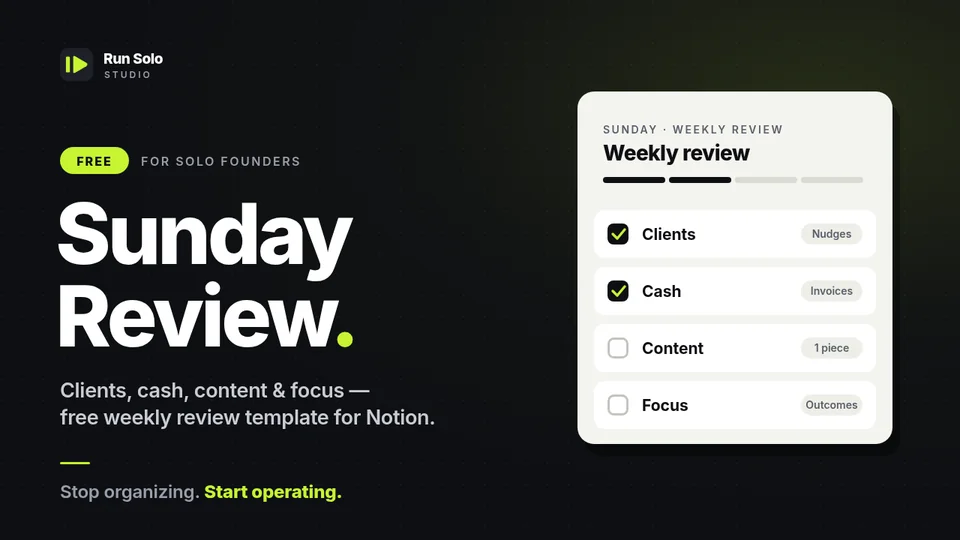
This weekly review template is one page with four blocks. Review your business, not your whole life.
Get it free ($0)You'll get the PDF + Notion template, plus a few short emails with weekly-review tips and our paid templates. Unsubscribe anytime.
Gumroad asks you to name a price. Type 0 and click “I want this!”. No card needed.
Want your Sunday Review answers in one place? Client Ops Kit ($29) is a connected Notion workspace for clients, projects, pipeline and finance, with a Home dashboard to go through once a week: each client's health status and next step. Works on Notion Free.
Want optional n8n automation too? Solo Operator Stack ($79) works on Notion Free, on its own. Add 6 optional n8n workflows (needs your own n8n), including emails to you about overdue invoices, cold deals and a Sunday digest.
Both come with a 14-day money-back guarantee.
Watch the demo
The problem: Sunday planning that turns into the whole Sunday
You open twelve tabs to "get on top of things" and end up rebuilding your dashboard instead.
The solution: one page, four blocks
The template has four blocks:
- Clients: mark each client green, yellow or red, and write one next action
- Cash: check what's invoiced, unpaid and overdue
- Content: pick what you'll publish this week
- Focus: choose three outcomes for Monday
The four blocks, explained
Work top to bottom. If a block finishes early, move on. Don't invent busywork.
1. Clients
Look at every active client and give each one a health status: green (on track and paid), yellow (needs a nudge, for example scope drift, a quiet week or an invoice pending) or red (at risk, for example money overdue, work blocked or no reply). For every yellow or red client, write one next action: who, what and by when. If a lead has been cold for more than 14 days, follow up or archive it. The block is done when every active client has a status and every yellow or red one has a next action.
2. Cash
Open your unpaid invoices, or the simple list you use. Write down everything that is expected, invoiced or overdue. Then send or schedule one reminder today: a soft one if the invoice is a few days late, a firmer one after a week. Write one number: the cash you expect this week. Flag anything more than 14 days overdue for a final follow-up on Monday. The block is done when one reminder is sent or scheduled and the number is written.
3. Content
Pick one idea from your backlog for one channel, such as LinkedIn, a newsletter or short videos. Write a one-line hook or schedule one post. Park the rest. This block is about choosing one thing, not batching a month of posts.
4. Focus
Write three outcomes for Monday. Not a to-do dump: three things you can ship or decide by the end of the day. Put a block on your calendar on Monday morning for the first one. Then close the laptop.
There is also an optional mini-prompt you can paste into an AI chat to draft three invoice reminder emails, and a short end-of-review snapshot for wins, cash, blockers and a 1–5 score.
What you get
A Notion template you duplicate into your own workspace, plus a short PDF guide showing how to use it each week. Both come in the same Gumroad download.
Who it's for
Freelancers and solopreneurs who want a simple weekly check, without a Life OS or habit tracker.
FAQ
- Is the weekly review template really free?
- Yes. It costs nothing. You download it from Gumroad.
- Does it work on Notion Free?
- Yes. The Notion template works on Notion Free. You don't need a paid plan.
- What's in the download?
- The Notion template and a short PDF guide on how to use it.
- What's the next step after the free template?
- If you want a place to track clients, projects, pipeline and invoices in Notion, see the Client Ops Kit ($29, Notion only). If you want Notion + n8n to email you overdue invoices and a Sunday digest, see Solo Operator Stack ($79).
Want reminders in your inbox?
Solo Operator Stack connects this review to Notion + n8n, so overdue invoices and a Sunday digest come to your inbox (09:00 by default, you pick the time).
Gumroad asks you to name a price. Type 0 and click “I want this!”. No card needed.